
- Echo Spot — compact, strong bedside routines.
- Echo Spot — low-cost, fits tiny nightstands.
- Echo Spot Glacier White — same features, lighter finish.
Quick picks
Shortlist: Echo Spot bedside picks


Nightstand Checklist
What matters for bedside smart displays
- Brightness & night mode
Screen brightness and reliable night modes matter most because light directly disrupts sleep; check minimum brightness, adaptive dimming, and warm-color presets.
Look forLow minimum brightness and automatic dim/bedtime schedules.AvoidHarsh, unadjustable blue-white light at night. - Camera and privacy controls
A camera on the nightstand can feel intrusive; prioritize a hardware shutter, one-touch mic/camera mute, and clear local/privacy settings.
Look forPhysical shutter and easy privacy toggles.AvoidAlways-on camera without obvious hardware controls. - Alarms, audio and wake options
Alarm quality, gradual volume ramp, and speaker clarity shape waking comfort; consider vibration or sunrise-style alarms if sensitive to noise.
Look forGentle wake modes and customizable alarm profiles.AvoidSingle loud alarm with no soft-start option. - Size, power and ecosystem fit
Compact footprint, cord length, and assistant integrations affect placement and automation more than raw specs.
Look forSmall base, adequate cable, and compatibility with chosen smart ecosystem.AvoidBulky design, short power cable, or incompatible platform.
Bedside rubric Match nightstand priorities to platform strengths
A bedside rubric for picking a platform
Choosing a smart display for the nightstand starts with priorities — visibility, sound, privacy, and how much intelligence should stay on the device. The short rubric below compares platform behavior dimension by dimension and notes the practical bedside impact.
Display
Amazon: compact, often circular or small rectangular screens that excel as an at-a-glance clock. Bedside impact: great for quick time, alarms, and glancing at song titles. Google: larger rectangular displays that favor touch controls and richer visuals. Bedside impact: easier to control media, follow recipes, or view photos from bed.
Brightness
Both platforms offer adaptive dimming and night modes. Devices vary: some dim to near-dark for sleep, others remain brighter. Prefer a model with low‑light auto‑dim and a night mode.
Speaker and mic
Amazon devices often push fuller bass in compact units; Google emphasizes clear vocals. Both offer far‑field mics and reliable wake-word detection, with small differences in follow-up query handling.
Camera and privacy
Some Amazon bedside models include a camera; some Google models omit it. For strict privacy, a no‑camera option or a physical camera cover reduces risk.
Local vs cloud processing
Google increasingly processes sensor and routine data on-device; Amazon mixes local routines with cloud services. Local processing reduces latency and may keep sensitive data off cloud servers.
Integrations
Amazon has a vast third‑party skill ecosystem; Google ties deeply into Google services (calendar, photos). For alarm + routines, either platform works; choice depends on existing smart-home investments.
Quick mapping:
- Priority: privacy → prefer cameraless models and local processing.
- Priority: richer display/media → favor larger Google displays.
- Priority: strong bedside audio → consider Amazon’s compact audio tuning.
| Alexa platform Echo Spot: Best Bedside Alexa Alarm Clock | VS | Google Assistant Echo Spot: Affordable Nightstand Smart Clock |
|---|---|---|
small, clock-friendly | Display | larger, control-friendly |
auto dim + night mode | Brightness control | adaptive low-light options |
full, bass-forward | Audio | clear vocals, balanced |
robust far-field mics | Voice pickup | very sensitive pickup |
built-in camera (many models) | Camera | no camera (some models) |
| Shop | Shop |
Tech & Privacy Q&A
Technical and privacy questions answered
Do Echo Show and Nest Hub listen to or record conversations?
Both devices listen locally for a wake word and don’t stream full audio until triggered; post-wake audio is processed in the cloud and may be stored per account settings. See the deeper privacy — do smart clocks record conversations? page for exact controls and retention policies.
Are wake‑word activations saved, and can those clips be deleted?
Most wake‑word activations produce short snippets uploaded to vendor servers for processing and optional review. Both platforms provide in‑app history, review and delete controls, and settings to limit or disable cloud recordings.
What happens to alarms during a power outage?
Alarms won’t sound while a device is unpowered. Some models retain schedules and resume normal behavior when power returns, but missed alarms typically won’t retroactively trigger unless the device has a battery backup or UPS.
Do alarms require a cloud account or paid subscription?
Basic local alarm functions generally work without paid subscriptions. Many smart features—multi‑device routines, remote management, or voice‑linked services—require an account, and offline capabilities vary by model.
Top bedside pick
Compact Alexa alarm for nightstands
Best overall bedside Alexa clock
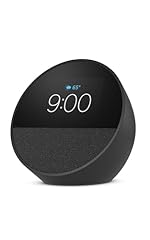
Echo Spot is a purpose-built, compact smart clock with a circular display that slips onto crowded nightstands and surfaces. Designed for glanceable info and automation, it centers Alexa routines and timed alarms rather than long-form video or visual controls, making it a focused bedside companion for homes that already use Amazon’s ecosystem.
- Tiny circular display keeps nightstand footprint minimal
- Strong Alexa routines and smart‑alarm customization
- Glanceable clock faces, weather, reminders and touch controls
- Surprisingly full sound for a bedside alarm
- Small screen poor for video or detailed visual tasks
- Fewer Google services and Nest integrations
- Less useful if voice assistant accuracy or sleep‑sensing features matter most
Echo Spot earns the bedside recommendation for users who want a small, unobtrusive clock that automates wake and sleep routines with Alexa. Compared with larger Echo Show models, it sacrifices screen size and visual versatility but wins on footprint and focused alarm features. Against the Nest Hub, the Spot fits better in Amazon homes and on tight nightstands; Nest Hub still leads for Google’s services, sleep sensing, and larger displays.
Budget bedside Echo Spot
Compact Alexa alarm clock
Budget-friendly bedside smart clock
A pared-down Echo Spot variant that keeps core Alexa smarts and dependable alarm behavior in a small, nightstand-friendly footprint. Cosmetic options and extra hardware are simplified — smaller screen, fewer finish choices, and fewer add-ons — but alarms, timers, routines and basic smart‑home control work the same as pricier Echo displays.
- Reliable alarm performance and timers
- Full Alexa voice features and routines
- Small footprint fits tight nightstands
- Good enough speaker for spoken audio
- Simplified finishes and fewer extras
- Smaller screen limits touch interactions
- Less suited for video calls or visuals
- Not aimed at audiophiles or media rooms
Style-first bedside runner-up
Bedside automation How platform choices shape nightstand routines
Ecosystems, automations, and bedside choices
Platform choice determines which automations run, where logic lives, and how private the bedside becomes.
Ecosystem trade-offs
- Alexa (Echo devices): Strong, easy-to-build Routines that tie alarms, smart plugs, and routines together; broad skill/device support makes device pairing straightforward. Many routines run in the cloud; some devices support local execution depending on model.
- Google Assistant (Nest Hub): Cleaner integration with Google services (Calendar, Maps) and decent routines; often favoured for simple wake-up sequences and media handoff. Local automation options are more limited than HomeKit/Home Assistant.
- HomeKit / Home Assistant: Prioritizes local execution and privacy. HomeKit offers simplicity for iPhone-centric homes; Home Assistant and Node-RED enable advanced conditional automations, presence detection, and sleep modes that avoid cloud dependency.
Practical bedside automations to copy
- Morning routine: alarm → bedside lamp dim up over 5 minutes → kettle smart plug on → briefing read aloud.
- Sleep mode: single button or scheduled trigger that mutes notifications, dims screen, locks camera, and sets thermostat.
- Motion-based night light: motion sensor triggers low-warm light only between set hours.
Advanced resources: Home Assistant docs, Node-RED flows library, Alexa Blueprints, and Google Home developer guides for custom routines and webhooks.



Quick decision flow
Choose by footprint, sleep sensitivity, and camera preference
- If the smallest nightstand footprint matters, favour compact Echo Spot-style devices.
- If sleep-sensitivity, local processing, and minimal cloud reliance matter, prioritise HomeKit or Home Assistant.
- If deep ties to Google services matter, pick the Google Nest Hub and build Assistant routines.
Ecosystem choice affects how automations run and what sensors can be trusted. Alexa is convenient for broad device compatibility and easy routines; Google integrates tightly with Google services; HomeKit/Home Assistant offers the most local control and privacy for advanced bedside automations.