
Side-by-Side Comparison
Alarm Clocks With Multiple Alarms


Open the comparison detailsCompare the criteria for the picks shown above.Show detailsHide details
Count Alarm Profiles, Then Check What Stays Independent
The number on the box is only the first filter. A useful multi-alarm clock also needs repeat rules, a clear way to switch one profile off without deleting it, and honest power-failure behavior. The table separates those functions for the six products currently shown on this page.
| Current product | Verified slots | Repeat rules | Independent controls | Snooze | Power-failure behavior |
|---|---|---|---|---|---|
| JALL V18039 | 3 alarms | Every day / Mon–Fri / Sat–Sun for each | Separate alarm controls; per-alarm volume not established | 9 minutes; up to 4 repeats | CR2032 retains settings; outage ringing not documented |
| Raynic CR1029 | 20 alarms + 20 reminders, seller/exact-model material | Exact rules not stated here | Capacity verified; full per-alarm independence unresolved | Not used as a decision claim | Adapter primary; outage ringing not established |
| Netzu 6208D | 2 alarms | Treat as daily; no exact day modes documented | Separate on/off for Alarm 1 and 2 | 9 minutes | AAA batteries retain settings; display off |
| JALL K8 | 2 alarms | Every day / weekday / weekend for each | Day group, sound, volume, light, and dawn duration per alarm | 5–20 minutes | CR2032 retains settings; AC required |
| USCCE UE168 | 2 alarms | All 7 days / Mon–Fri / Sat–Sun for each | Separate alarm on/off and repeat switches | 9 minutes | Manual documents alarms in battery mode; screen sleeps |
| Odokee UE218 | 2 alarms | All 7 days / Mon–Fri / Sat–Sun for each | Separate alarm on/off and repeat switches | 9 minutes | Manual documents alarms in battery mode; screen sleeps |
A weekday/weekend switch is useful, but it is not a full seven-day scheduler. None of the exact manuals used for the conventional two- and three-alarm clocks establishes a separate time for every individual day of the week. If Tuesday and Thursday must differ from Monday, Wednesday, and Friday, write that requirement down before choosing a model.
Backup also has two meanings. JALL V18039, JALL K8, and Netzu retain settings but do not provide the same documented outage behavior as USCCE UE168 and Odokee UE218. Raynic's large reminder bank is attractive for complex routines, but incomplete primary documentation means unresolved fields stay unresolved instead of being filled from a similar calendar clock.
Two Alarm Times Are Not the Same as a Weekly Schedule
A clock can store two times and still be awkward for a changing week. Imagine one alarm at 6:30 a.m. and another at 7:15 a.m. If both repeat every day, the second profile does not automatically become a weekend schedule. The useful question is not only how many times can it store? It is which days, controls, sounds, and power rules belong to each stored time?
Start with alarm slots. One person may use two slots as a primary and a backup separated by ten or 15 minutes. Two people may need one slot each. A three-alarm clock can keep a third time ready for early shifts, school days, or a recurring morning task. A 20-alarm clock belongs to a different use case: many alerts distributed through a day. More slots help only when the interface makes active entries easy to review and deactivate.
Then check schedule granularity. The JALL, USCCE, and Odokee manuals use three grouped modes: every day, weekdays, or weekends. That is enough for many workweeks, but it cannot assign a unique time to Tuesday without also changing the other weekdays. A product page that says “weekday mode” therefore should not be summarized as “choose any days.” If an individual-day pattern matters, confirm it in the delivered manual before the return window closes.
Independence is the third layer. Separate on/off controls let you pause a profile without erasing its time. JALL K8 goes further by tying documented sound, volume, light intensity, and dawn duration to each of its two alarms. Other clocks use global volume or dimmer controls. Neither approach is universally better, but the distinction matters for two sleepers with different preferences.
Finally, separate memory backup from operational backup. A coin cell may remember the time while the clock is dark and silent. USCCE and Odokee manuals explicitly describe reduced-power battery modes in which the screen sleeps but alarm functions remain available. Even then, verify the exact delivered unit rather than treating batteries as a permanent primary power source. TOPCLOCKS did not conduct outage, loudness, battery-life, or wake-up tests for this update; the distinctions above come from exact manuals and bounded offer evidence.
Check List On The Best Alarm Clocks With Multiple Alarms

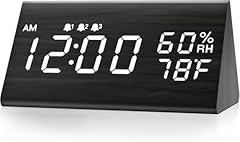
JALL V18039 Three-Alarm Wood-Style Digital Clock
Stylish clock with three alarms and sensorsBest Fit
Best fit: one person needing a main alarm, a backup, and a third recurring cue. JALL V18039 is the only conventional bedside clock here with three documented alarm controls.
Key Features
- Three stored alarms.
- Each repeats every day, Monday–Friday, or Saturday–Sunday.
- Five volume levels; nine-minute snooze up to four times.
- USB-C/adapter power; CR2032 retains settings.

Practical Use
Keep weekday, weekend, and early-start profiles stored together. During setup, write down what each slot means because the display cannot name the schedule.
Limitations and Final Take
The fixed groups are not arbitrary individual days. Volume levels are documented, but per-alarm volume is not. The coin cell is memory backup, not proof of outage ringing. Final take: the choice for three wake schedules when 5/2 grouping is enough.
What Are The Pros
- Three verified alarm profiles with their own repeat-mode switches.
- Clear weekday/weekend split without re-entering times.
What Are The Cons
- No arbitrary individual-day scheduling.
- Backup cell retains settings rather than documented outage ringing.

Best choice&check JALL V18039 Three-Alarm Wood-Style Digital Clock
Digital Alarm Clock, with Wooden Electronic LED Time Display, 3 Alarm Settings, Humidity & Temperature Detect, Wood Made Electric Clocks for Bedroom, Bedside (Black)

Raynic CR1029 20-Alarm Digital Date Clock
Best for clear date-and-time displayBest Fit
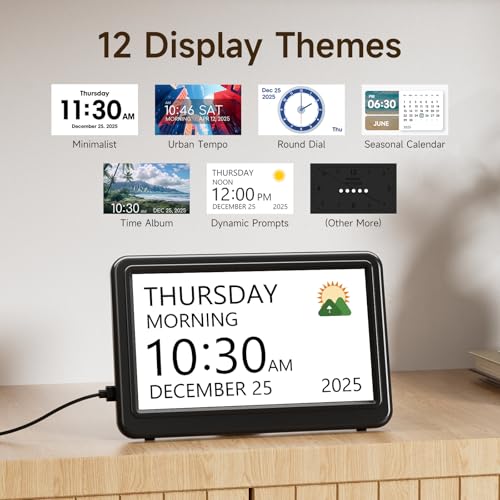
Best fit: a day that genuinely needs many alerts. Raynic CR1029's exact offer and accessible exact-model material describe 20 alarms plus 20 reminders.
Key Features
- Twenty alarm and 20 reminder slots.
- Seven-inch date/time display.
- Seller-described themes and semi-automatic dimming.
- Adapter-powered normal operation.
Practical Use
List every recurring cue and decide whether it belongs in the alarm or reminder bank. For only two wake times, these menus may add work; for a reminder-heavy day, capacity prevents constant overwriting.
Limitations and Final Take
The secondary manual mirror does not justify claims about per-alarm volume, arbitrary days, snooze collisions, or outage ringing. Final take: choose Raynic when capacity is the actual requirement, not because 20 automatically means greater flexibility.
What Are The Pros
- Far more stored alarms and reminders than a dual-alarm clock.
- Date-oriented display keeps scheduled cues in day context.
What Are The Cons
- Exact per-alarm independence is not fully documented in a primary manual.
- Excessive for a routine that needs only two wake times.

RecommendedRaynic CR1029 20-Alarm Digital Date Clock
Raynic Date Clock, Digital Calendar Clock with 12 Themes, 20 Alarms, 20 Reminders, Semi-Automatic Dimming, 12/24 Hours, Auto DST for Desktop, Office, Students (Black, 7 Inches)

Netzu 6208D RGB Dual-Alarm Clock
Best for heavy sleepers who need loud alarmsBest Fit
Best fit: two recurring daily times with direct individual activation. Netzu 6208D adds adjustable brightness, volume, and secondary RGB lighting.
Key Features
- Two alarms with separate on/off controls.
- Five brightness settings, including display off.
- Four volume levels; nine-minute snooze.
- AAA backup retains settings; display goes dark.

Practical Use
Use it for two people or a primary-plus-backup pair. One profile can stay stored while disabled. Treat both as daily alarms because the exact accessible manual does not document weekday/weekend modes.
Limitations and Final Take
RGB, brightness, and volume do not add schedule granularity. Backup is documented for memory, not outage ringing. Final take: a clear dual-alarm option for two daily times, not a variable week.
What Are The Pros
- Each of the two alarm profiles can be switched independently.
- Display-off option and documented brightness/volume controls.
What Are The Cons
- No verified weekday/weekend repeat modes for the exact model.
- Backup is documented for memory, not autonomous display or ringing.

High qualityNetzu 6208D RGB Dual-Alarm Clock
Netzu Loud Alarm Clock for Heavy Sleepers, RGB Alarm Clocks for Bedrooms Seniors Kids, Plug in Digital Clock with 5 Dimmers, 2 Alarms, 4 Volumes and Snooze

JALL K8 Dual-Alarm Sunrise Wake-Up Light
Best for gentle wake-ups and kidsBest Fit
Best fit: two schedules needing more independence than time alone. JALL K8 gives Alarm 1 and Alarm 2 their own day group, sound, volume, light intensity, and dawn duration.
Key Features
- Every-day, weekday, or weekend mode per alarm.
- Per-alarm sound, volume, light, and dawn duration.
- Five- to 20-minute snooze.
- AC required; CR2032 retains settings.

Practical Use
It suits two sleepers with different wake styles or separate workday/weekend profiles. Check both alarm indicators after edits; sound and light cannot both be disabled for one profile.
Limitations and Final Take
Fixed day groups are not individual-day programming, and sunrise claims do not establish health benefits. Final take: the most configurable two-profile option here when sound-and-light independence matters.
What Are The Pros
- Strong per-alarm control over day group, sound, volume, light, and dawn duration.
- Adjustable snooze window for the exact K8 model.
What Are The Cons
- Only two alarm profiles and fixed day groups.
- Requires AC; the coin cell is settings backup only.

JALL K8 Dual-Alarm Sunrise Wake-Up Light
Wake Up Light Sunrise Alarm Clock for Kids, Heavy Sleepers, Bedroom, with Sunrise Simulation, Sleep Aid, Dual Alarms, FM Radio, Snooze, Nightlight, Daylight, 7 Colors, 7 Natural Sounds, Ideal for Gift

USCCE UE168 Dual-Alarm Clock Radio with USB
Best with radio and extra featuresBest Fit
Best fit: two repeat schedules with tone or FM radio. The UE168 manual documents separate alarm on/off controls and a repeat switch for each profile.
Key Features
- All-days, Monday–Friday, or weekend mode per alarm.
- Five sounds or FM radio.
- Nine-minute snooze and two USB ports.
- AAA reduced-power alarm mode; screen sleeps.

Practical Use
Keep workday and weekend profiles stored, or assign one to each sleeper. Battery mode retains clock and alarm functions while the screen sleeps after eight seconds; verify the delivered UE168.
Limitations and Final Take
Repeat groups are not individual days, and USB charging stops without AC. Radio reception was not tested. Final take: a practical dual schedule when radio and documented battery-mode alarms matter.
What Are The Pros
- Independent two-alarm on/off and repeat switches.
- Official manual documents alarm operation in reduced-power battery mode.
What Are The Cons
- No arbitrary day-by-day programming.
- Screen sleeps and USB charging stops during battery mode.

USCCE UE168 Dual-Alarm Clock Radio with USB
uscce Digital Dual Alarm Clock Radio - 0-100% Dimmer with Weekday/Weekend Mode, 6 Sounds Adjustable Volume, FM Radio w/Sleep Timer, Snooze, 2 USB Charging Ports, Thermometer, Battery Backup

Odokee UE218 Dual-Alarm LED Clock
Great budget bedside clock with USBBest Fit
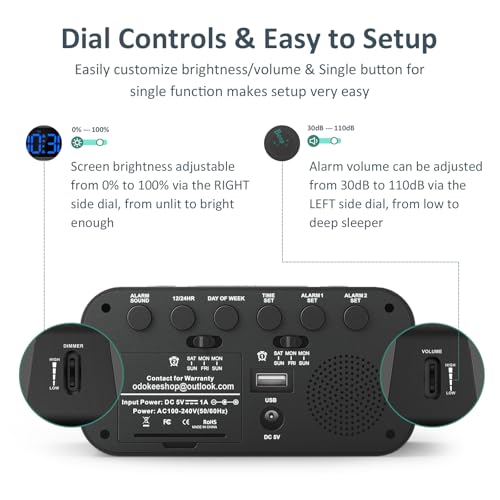
Best fit: a compact dual alarm with direct physical controls. Odokee UE218 uses separate alarm buttons, repeat switches, dimmer and volume dials, and a large snooze control.
Key Features
- Two alarms with separate on/off controls.
- All-days, Monday–Friday, or weekend mode per alarm.
- Five sounds; nine-minute snooze.
- AAA reduced-power alarm mode; USB requires AC.
Practical Use
One alarm can remain stored but disabled, which suits rotating workday/weekend profiles. Exact UE-218-Blue mapping prevents specification transfer from similar Odokee sizes.
Limitations and Final Take
Dimmer and volume are global controls, not per-alarm settings. The display sleeps in battery mode. Final take: the simple-control choice for two grouped schedules, not extra capacity.
What Are The Pros
- Simple controls with separate alarm activation and repeat switches.
- Exact manual documents reduced-power battery-mode alarm operation.
What Are The Cons
- Only daily, weekday, and weekend repeat groups.
- Display sleeps and USB charging is unavailable in battery mode.

Odokee UE218 Dual-Alarm LED Clock
Digital Dual Alarm Clock for Bedroom, Easy to Set, 0-100% Dimmer, USB Charger, 5 Sounds Adjustable Volume, Weekday/Weekend Mode, Snooze, 12/24Hr, Battery Backup, Compact for Bedside(Blue)
Build Your Week Before You Buy the Clock
A short paper schedule exposes limitations that product titles hide. Run this check before ordering, then repeat it with the delivered clock while returns are still straightforward.
Write every required time
List each wake time or reminder and the days it applies. Keep a backup alarm separate from a genuinely different schedule.
Count profiles, not marketing words
Match the list to two, three, or 20 stored profiles. Confirm how many can remain enabled simultaneously instead of assuming “multiple” means unlimited.
Map the repeat rules
Mark every-day, weekday, weekend, or exact individual-day requirements. Do not squeeze a Tuesday-only need into a Monday–Friday switch.
Check what is independent
Verify whether on/off state, sound, volume, light, and snooze belong to each profile or to the clock as a whole. Test disabling one alarm without deleting its time.
Create a snooze collision test
Place two alarms close together and observe the exact model. If the first is snoozed, make sure the next alarm still has a clear, understandable behavior.
Test a safe power interruption
Follow the manual, disconnect AC briefly, and check the screen, stored times, active indicators, and alarm behavior. Never assume a memory battery can run the full clock.
After restoring power, review all enabled indicators once more. Complex schedules fail most often through an inactive profile, the wrong day group, AM/PM confusion, or a changed global volume—not because the clock lacks another decorative feature.
Related Articles


Match the Clock to the Scheduling Problem
For three ordinary recurring wake schedules, JALL V18039 is the clearest fit and remains first in the current TOPCLOCKS order. Its three alarm controls and per-alarm every-day/weekday/weekend switches solve a problem that dual alarms cannot. It is not a seven-day scheduler, and its coin cell should be treated as memory backup only.
For a high number of daily alerts, Raynic CR1029 is the capacity choice. Its seller and exact-model material describe 20 alarms and 20 reminders. Buy that capacity only when the user can maintain many entries; exact per-alarm rules and outage behavior are not documented strongly enough here to turn every possible feature into a promise.
For two schedules, choose by independence. JALL K8 offers the richest per-profile control because its two alarms can carry their own repeat group, sound, volume, light, and dawn duration. Netzu 6208D is simpler and fits two recurring daily times, but exact weekday/weekend rules are not established. USCCE UE168 adds FM radio and an official manual that documents alarm function in battery mode. Odokee UE218 offers the most direct physical control layout and similar grouped scheduling without the radio emphasis.
The decisive feature is therefore not the largest number on the listing. It is the smallest clock architecture that can reproduce the real week without nightly reprogramming. Confirm the delivered model, run the six-step setup test, and keep the shared TOPCLOCKS rating explanation separate from merchant stars and product specifications.
Multiple-Alarm Clock FAQ
These answers focus on the distinctions most likely to change the buying decision: stored profiles, day rules, independent controls, snooze, and backup power.
How many alarms does a multiple-alarm clock have?
There is no single standard. The current shortlist includes two-alarm, three-alarm, and 20-alarm designs. Count verified stored profiles for the exact model rather than relying on the word “multiple.”
Is a dual-alarm clock enough for two people?
Often, yes—if each person needs one recurring time and each profile can be switched independently. If both users also need separate weekday and weekend times, two slots may be insufficient or require frequent changes.
Can every day have a different alarm time?
Not on the conventional exact models documented here. JALL, USCCE, and Odokee provide every-day, weekday, and weekend groups. Those modes do not create seven individually programmable days.
Can I disable one alarm without deleting it?
JALL, Netzu, USCCE, and Odokee document separate alarm controls that let a stored profile be inactive. Confirm the indicator after switching it off so the time remains stored but will not sound unexpectedly.
Are sound and volume independent for each alarm?
Only claim this when the exact manual ties those fields to each profile. JALL K8 documents per-alarm sound and volume. Other models may use global volume or provide incomplete evidence, so do not infer independence from two alarm times.
What happens if snooze overlaps the next alarm?
Behavior can vary, and the accessible manuals do not provide a universal rule. Test two nearby alarms on the delivered clock, snooze the first, and verify that the second remains understandable and active.
Does battery backup preserve settings or actually sound the alarm?
It may do either. JALL and Netzu evidence supports settings retention. USCCE UE168 and Odokee UE218 manuals describe alarm functions in reduced-power battery mode while the screen sleeps. Check the exact model wording.
Will the display stay on during a power outage?
Do not assume it will. Netzu's display is off on backup, and USCCE/Odokee battery modes let the screen sleep after several seconds. A clock can retain or sound an alarm without providing a continuously lit display.
Is a 20-alarm clock always better than a dual alarm?
No. A large reminder bank helps a complex day, but it also creates more entries to review. Two clearly controlled profiles are better for a simple couple or backup-alarm scenario than unused capacity and extra menus.
Should I use one profile as a backup alarm?
That is a common and valid use. Place it far enough after the first to serve a purpose, then test how snooze and dismissal work. A backup profile does not replace checking volume, active indicators, and power behavior.
Are multiple-alarm clocks suitable for medication reminders?
A clock may provide recurring cues, but this page does not establish medical-device reliability or suitability. For safety-critical medication schedules, use the plan recommended by the relevant clinician or a purpose-built reminder system.
Do TOPCLOCKS ratings come from Amazon review stars?
No. The card scores are TOPCLOCKS proprietary subjective expert ratings. They remain in the current published order and are explained on the site's rating-method page; they are not merchant star averages.